
Projekt-Manager2017 - Download
You'll be able to download in few seconds.
Publisher Description
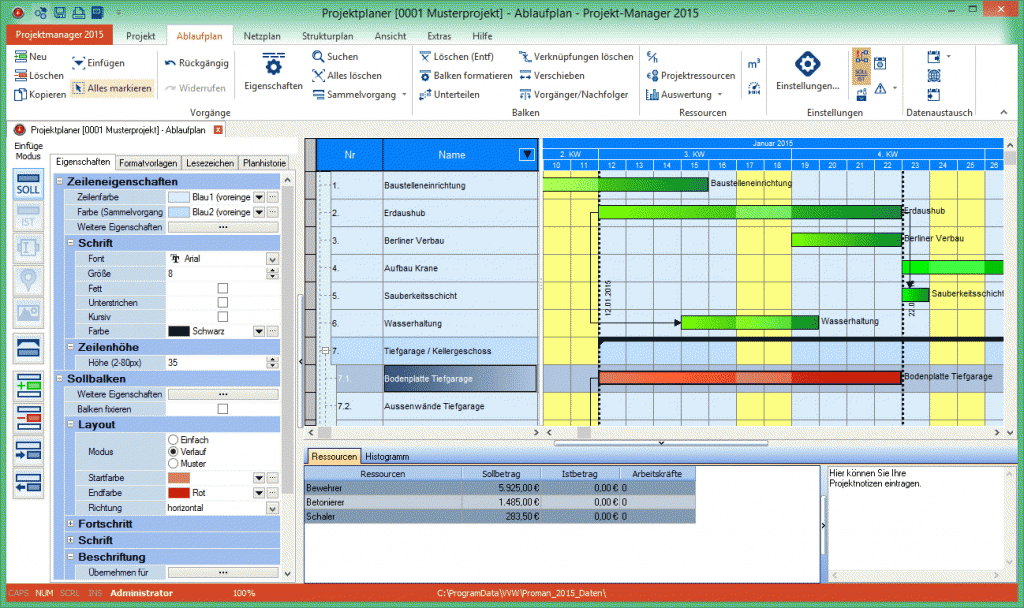
Projekt Manager 2017 is a convenient software that enables you to copiously scheduling construction sequences, manpower, cost and resources. Different charts such as bar chart, structural plan, network plan and flowchart optimally visualize sequences and structures. You are enabled to allocate different parameters and costs in order to retain project progress and budget control. Budget overrun, staff shortages or critical postponements are shown immediately and so you are able to control projects.
Features and characteristics
- ready for Windows 10
- project planning
- construction scheduling
- absence scheduling
- capability planning
- structural planning
- network plan
- manpower and resource scheduling
- cubic capacity calculation
- critical path calculation
- capacity optimization
- schedule optimization
- subtasks and summary tasks
- milestones
- budget and cost management
- template management
- nominal-actual comparison
- flow chart PDF-file generation
- automatic update
- legend editor
- holidays for Austria, Switzerland and Germany
- external files integration (*.doc, *.xls, etc.)
- address management
- hourly pay slip
- word processing with mail merge function
- image database
- event notification
- resource allocation
- resource histogram
- emailing PDF-file schedules
- payment schedule
- list of dates
- report generator
- user management
- data backup
- schedule publishing at web
- configuration assistant
- floating license for network version
About Projekt-Manager
This Project Management program is available in German. It was last updated on 29 September, 2026. Projekt-Manager is compatible with the following operating systems: Other, Windows.
The company that develops Projekt-Manager is Vordruckverlag Weise GmbH. The latest version released by its developer is 2017.
The download we have available for Projekt-Manager has a file size of 161.5 MB. Just click the green Download button above to start the downloading process. The program is listed on our website since 2016-11-15 and was downloaded 0 times. We have already checked if the download link is safe, however for your own protection we recommend that you scan the downloaded software with your antivirus. Your antivirus may detect the Projekt-Manager as malware if the download link is broken.
How to install Projekt-Manager on your Windows device:
- Click on the Download button on our website. This will start the download from the website of the developer.
- Once the Projekt-Manager is downloaded click on it to start the setup process (assuming you are on a desktop computer).
- When the installation is finished you should be able to see and run the program.
Program Details
System requirements
Download information
Pricing
Version History
version 2017
posted on 2016-11-15
Disclaimer
External Download
We do not host Projekt-Manager on our servers. We did not scan it for viruses, adware, spyware or other type of malware. This app is hosted by the software publisher and passed their terms and conditions to be listed there. We recommend caution when installing it.
The external download link for Projekt-Manager is provided to you by apps112.com without any warranties, representations or guarantees of any kind, so access it at your own risk.
If you have questions regarding this particular app contact the publisher directly. For questions about the functionalities of apps112.com contact us.
